Approval Workflows Guide
Stratapilot · Help Centre Last updated: June 2026
Overview
The Approvals section is a unified inbox showing every pending approval request across the platform — pet registrations, owner requests, and other workflows that require a committee decision. Instead of hunting across different modules, executives can review and act on all pending items in one place.
Who Can Do What
| Action | Executive | Ordinary Member | Caretaker | Viewer |
|---|---|---|---|---|
| View all approvals | ✅ | ✅ | ❌ | ❌ |
| Approve / reject items | ✅ | ❌ | ❌ | ❌ |
Approval actions are taken on the source record (e.g. the pet registration or request detail page). The Approvals section is a read and navigate view, not a standalone action form.
What Appears in Approvals
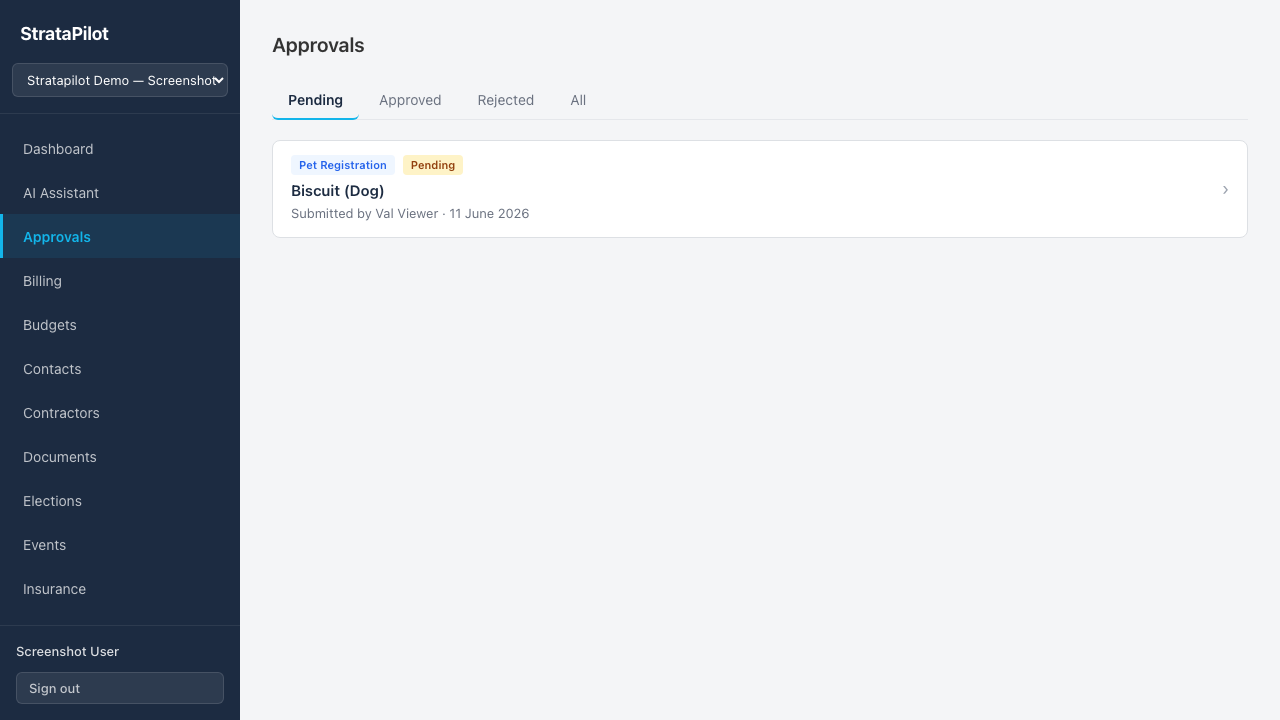
The Approvals inbox aggregates items from approval workflows across the platform:
| Workflow type | Description |
|---|---|
| Pet registration | A lot owner has submitted a pet registration awaiting committee approval |
| Owner request | A lot owner has submitted a formal request (e.g. renovation approval, exclusive-use request) |
Each card shows:
- The workflow type label
- The status (Pending, Approved, or Rejected)
- The title of the item
- Submitted by and submission date
- A decision note if one was provided (shown in italics)
- Decided by and decision date if the item has been actioned
Filtering by Status
Use the tabs at the top of the Approvals page to filter:
| Tab | What it shows |
|---|---|
| Pending | Items awaiting a decision |
| Approved | Items that have been approved |
| Rejected | Items that have been rejected |
| All | All approval items regardless of status |
Acting on an Approval
Click any approval card to navigate directly to the source record (e.g. the pet registration detail page). From the source record, take the relevant action (Approve or Reject) and optionally add a decision note.
Direct approval must be enabled in Settings → Approvals → Direct approval before executives can approve or reject items directly. When direct approval is disabled, approvals require a committee vote.
Direct Approval Setting
The direct approval setting controls whether executives can approve or reject items (such as pet registrations) without a committee vote.
| Direct approval setting | Behaviour |
|---|---|
| Enabled | Executives can approve or reject directly from the item detail page |
| Disabled (default) | Committee vote is required before an item can be approved |
To change this setting, go to Settings → Approvals → Direct approval and toggle the checkbox (Scheme Admin access required).
Approval Workflow for Pet Registrations
See the Pet Registration Guide for the full pet registration and approval process.
- Lot owner submits a pet registration → status: Pending
- All executives receive an email notification
- An executive reviews the registration in the Approvals inbox or directly in Pets
- The executive approves or rejects and optionally adds a decision note
- The lot owner is notified by email of the outcome
Frequently Asked Questions
What does "Direct approval disabled" mean in practice? When direct approval is disabled, the Approve/Reject buttons are not available on item detail pages. The committee would need to run a formal committee poll to decide on the request. This is a more formal governance approach appropriate for some schemes.
Can ordinary committee members approve items? No. Only executives (Chairperson, Secretary, Treasurer) can approve or reject approval workflow items.
Is there an audit trail of approval decisions? Yes. Each approved or rejected item records who made the decision and when. This information is shown on both the approval card and the source record detail page.
Can I add a note when rejecting? Yes. The decision note field is available on the source record (e.g. pet registration detail). Use it to record the reason for rejection, which is included in the email notification to the submitter.
This guide documents Stratapilot platform behaviour.