Mobile Portal Guide
Stratapilot · Help Centre Last updated: June 2026
Overview
Stratapilot's mobile portal is a streamlined Progressive Web App (PWA) experience designed for lot owners who need quick access to levy balances, open polls, scheme notices, and the ability to submit a report or complaint — all optimised for a phone screen.
The mobile portal is separate from the full desktop/tablet interface. It provides a focused set of features for lot owners on the go.
Accessing the Mobile Portal
The mobile portal is accessible at /m/<scheme-id>/ from a mobile browser. When you open Stratapilot on a phone, you are automatically directed to the mobile-optimised view.
Installing as a PWA
To add Stratapilot to your phone's home screen for quick access:
iPhone (Safari):
- Open Stratapilot in Safari.
- Tap the Share button (box with arrow pointing up).
- Scroll down and tap Add to Home Screen.
- Tap Add.
Android (Chrome):
- Open Stratapilot in Chrome.
- Tap the three-dot menu (⋮).
- Tap Add to Home screen.
- Tap Add.
Once installed, the app launches in full-screen mode without the browser toolbar.
Mobile Dashboard
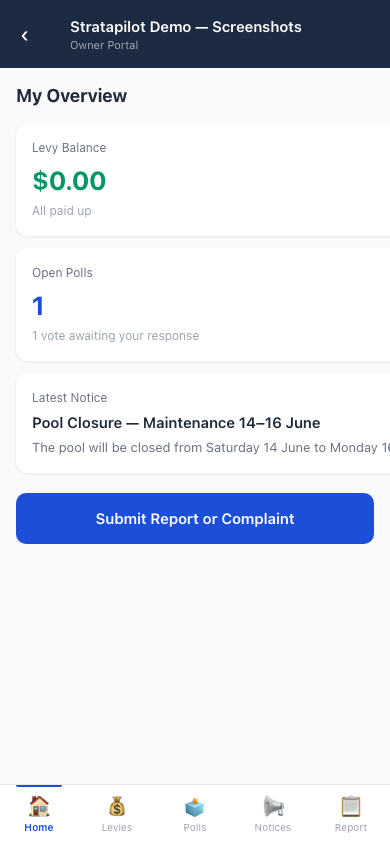
The mobile dashboard shows your key information at a glance:
| Card | What it shows |
|---|---|
| Levy Balance | Your total outstanding levy amount across all your lots. Green = no debt; red = outstanding amount |
| Open Polls | The number of general-meeting polls currently open for your vote |
| Latest Notice | The most recent published announcement from the committee |
On wider screens (600px and above), cards are shown in a two-column grid layout.
Features Available on Mobile
Levy Balance
Tap the Levy Balance card to go to My Levies, which shows a full breakdown of outstanding and paid levy notices across all your lots.
Voting in Polls
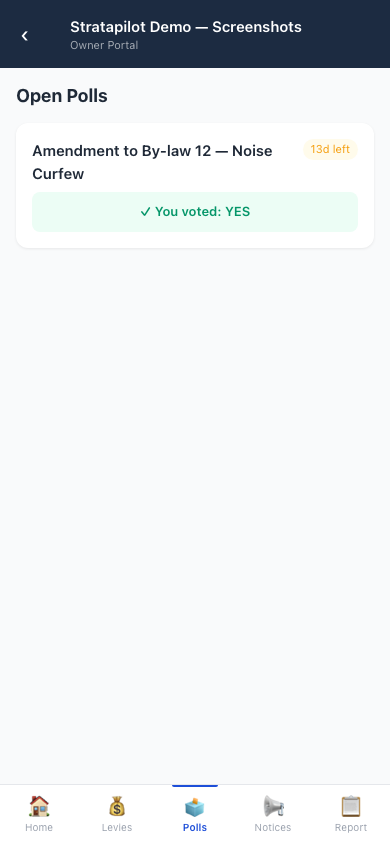
Tap the Open Polls card to see active general-meeting polls. Vote YES, NO, or ABSTAIN directly from the mobile view.
Reading Notices
Tap Latest Notice or go to Notices to read all published scheme announcements.
Submitting a Report or Complaint
Tap the blue Submit Report or Complaint button on the dashboard to open the mobile report submission form. This is the same report submission available in the full interface — choose a type, category, describe the issue, and optionally attach photos.
What the Mobile Portal Does Not Include
The mobile portal is designed for lot owners (Viewer role). Committee-specific features are not available in the mobile view:
- Tasks management
- Committee polls
- Documents management (upload/download)
- Elections
- Settings
- Insurance, Contractors, Budgets
For full committee functionality, use the desktop interface.
Mobile Layout Behaviour
| Screen width | Layout |
|---|---|
| Under 600px | Single-column stacked cards |
| 600px and above | Two-column card grid |
The portal automatically adjusts to the device screen width.
Frequently Asked Questions
Is the mobile portal available to committee members? Yes — committee members can also use the mobile portal, but it only shows lot-owner features. For committee tasks, use the full desktop interface.
Does the mobile portal work offline? As a PWA, the app shell loads from cache when offline, but real-time data (levy balance, polls, notices) requires an internet connection.
Can I manage my pet registrations from mobile? The mobile portal does not include the pet registration flow. Use the full desktop/tablet interface to submit or check a pet registration.
Why does my levy balance show in red? A red balance indicates an outstanding amount owed. Tap the card to see a full breakdown of unpaid notices. Contact your scheme's treasurer if you believe the balance is incorrect.
How do I switch between schemes on mobile? If you are a member of multiple schemes, a scheme selector appears at the top of the mobile navigation. Tap it to switch.
This guide documents Stratapilot platform behaviour. For scheme-specific questions, contact your committee's secretary or chairperson.